


Volume Control Sound Launcher
4.58.55K Reviews
App Specs
- Version
- 1.12.0
- Updated On
- License
- Free
- Downloads
- 1,000,000+
- Developer
- AtomApplications
- Categories
- Tools
- Platform
- Android
Screenshots
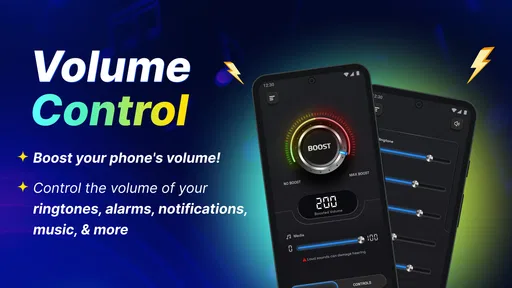
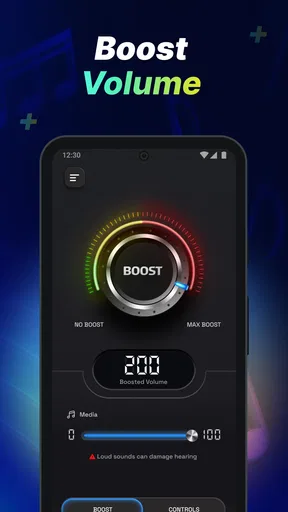
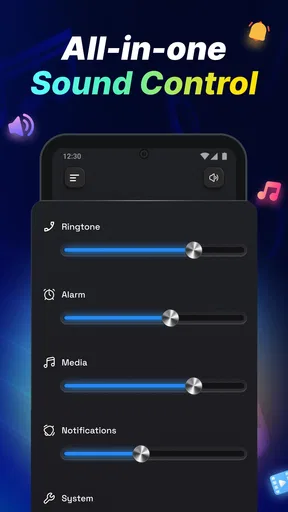
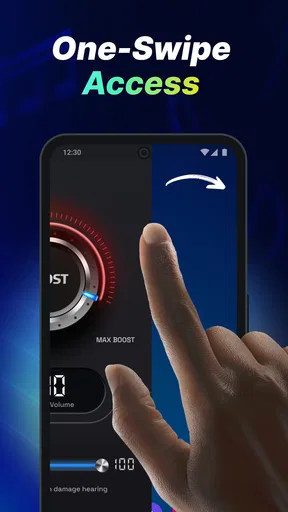
 Analysis by AppCompare
I find volume control becomes surprisingly fiddly when the same phone has to work for quiet meetings, outdoor listening, calls, and alarms. Volume Control Sound Launcher is aimed at making those changes easier to manage. It is a free Android tools app from AtomApplications, and its appeal is practical: it brings sound settings into a more convenient routine rather than asking me to keep hunting through system menus.
Quick adjustments without unrealistic speed promises
For a tool like this, speed is less about flashy animations and more about how quickly I can reach the setting I need. A home-screen shortcut or profile can reduce the steps between noticing that the phone is too loud and changing its sound setup. That is most useful when I already know what I want, such as lowering notification volume before a conversation or making an alarm easier to hear.
I would still treat the phone’s own controls as the fallback. An app can make common adjustments more convenient, but it cannot make every device behave identically. Android versions, manufacturer settings, and sound routing can affect what a volume change does. If a connected headset or another audio device is involved, I would check the result rather than assume one tap has changed every output in the same way.
Profiles are most useful when routines repeat
The strongest case for saved sound setups is repetition. If I switch between a workday, exercise, and time at home, separate profiles can spare me from adjusting several volume sliders each time. The useful habit is to name each setup for the situation it serves and keep the differences deliberate: for instance, quiet notifications for focused work, but an alarm level that remains easy to hear.
That last detail matters. A silent or low-volume setup can be convenient in a meeting, yet it is a poor choice to leave active overnight if I rely on an audible alarm. I would make a quick check of the active profile before bed, especially after a day when I changed settings for a particular place. Convenience is only helpful when the selected sound arrangement still fits the next part of the day.
Profiles also work best when I avoid making too many. A small set for genuine recurring situations is easier to recognize than a long list of nearly identical options. Before saving one, I would decide which sound channels need to change and which should stay put. That makes a profile more predictable and reduces the chance of silencing something important along with the sounds I meant to quiet.
Using quick access in everyday situations
Widgets can make a difference when I need a change while moving between tasks. A realistic example is arriving at a shared office: I can use a suitable setup before a meeting, then restore a more noticeable notification level when I leave. At the gym, a media-focused setup can be handy, though I would check call and alarm levels separately rather than assume raising music volume also makes every other sound louder.
Worth Reading Before You Choose

EA SPORTS FC Mobile 26 Is a Bigger Football Game, but It Takes Time

Flipboard Shows What News Apps Must Do Beyond the Feed

Switching to Android Auto Means Rethinking Your Driving Routine

Google Calendar Makes a Crowded Week Easier to Manage

Ludo King Makes the Most of the Minutes Between Plans

Baby Panda World Brings Quick Play to Modern Phones, but Its Game Library Feels Busy
This is a useful distinction for anyone wondering whether an audio booster is the same as a single master-volume control. Phones commonly separate media, calls, notifications, and alarms because each serves a different purpose. Managing them as separate channels gives more control, but it also means I need to think through the whole setup instead of turning one slider up and expecting every sound to follow.
For a new user, I would start with one profile and test it in a low-stakes moment. Change the levels, save the arrangement, activate it, and then check a notification and an alarm when appropriate. That small trial helps catch a setting that is too quiet before it matters. It is also a sensible way to learn whether a shortcut fits naturally into the way I use my phone.
Automation needs a little common sense
Automatic rules can reduce routine taps, but they deserve more care than a manual switch. A rule tied to a location or network may be convenient in a familiar routine, yet I would not depend on it as the only safeguard for an important call or alarm. Situations change: I might visit a different office, use a guest network, or leave the phone in a profile that no longer suits the moment.
My approach would be to use automation for low-risk convenience and keep a quick manual way to inspect or change the sound setup. If I create a rule, I would test both sides of it: what happens when the condition is met and what the phone does after that condition ends. This is a practical check, not a claim that every device or rule will behave the same way.
How it fits into a real phone routine
Compared with adjusting Android’s built-in sound controls, an app like this is most valuable when I make the same changes repeatedly. The system settings are a straightforward choice for a one-off adjustment and are already familiar to many users. A profile-and-widget approach can be more convenient for recurring transitions, while a dedicated automation setup may suit someone who wants rules to handle changes with less input. I would choose the simplest option that reliably fits my habits rather than adding another layer without a clear reason.
It is also worth separating volume management from solving poor audio quality. Raising a level can help a quiet alarm or recording feel more audible, but it cannot repair a weak speaker, make a noisy room quiet, or guarantee clearer calls. If the problem is distortion at high volume, I would lower the level and check the audio source or device instead of assuming that pushing sound harder will improve it.
People who want to manage recurring sound situations are the clearest audience for this kind of tool. It may be especially useful if they often silence notifications for work and later forget to restore them, or if they prefer a home-screen control to navigating several system screens. Someone who changes volume only occasionally, dislikes extra controls, or needs a guaranteed hardware-level fix may be happier sticking with the phone’s existing settings or addressing the device itself.
There is a small trade-off in convenience: shortcuts and saved setups help only if I remember which one is active. I would keep profile names plain and recognizable, then check the phone after any unusual change, such as connecting a new audio device or switching to a different daily routine. That is a more dependable habit than expecting automation to anticipate every exception.
Compatibility, stability, and sensible expectations
The app is intended for Android, has an Everyone content rating, and requires Android 10 or later. That makes checking the operating-system requirement the first practical step before installing it. Its current version is 1.6.0. The app has a 4.4 average from around 8,200 ratings, with over one million installs; those figures suggest broad interest, but they do not tell me how it will behave on a particular phone.
I would not judge resource use from a category label or assume an app is invisible simply because its job is small. For a volume utility, the sensible test is whether it remains responsive during ordinary use and whether the controls are still available when I need them. If something seems out of step, I would first check the active profile and the phone’s own sound settings before repeatedly changing levels. This keeps troubleshooting simple and avoids confusing a device setting with an app control.
Reliability also means being cautious with anything that affects alerts. I would test the setup after creating a profile or rule, and I would avoid relying on a new configuration for an important alarm until I had confirmed the sound level. That is especially useful for people who silence their phones during the day and expect them to return to a louder arrangement later.
Who should choose another approach
This is not the right answer for every sound problem. If I need a physical volume button repaired, clearer audio from a damaged speaker, or stronger sound from a device that has reached its practical limit, a software control cannot replace a hardware fix. If I want only occasional volume changes, Android’s built-in controls may be enough. And if I need a sound arrangement that must never miss an alert, I would keep the phone’s alarm settings and real-world testing central rather than trusting a profile alone.
For someone who enjoys careful setup, the app’s value is less about making the phone louder in every situation and more about making changes deliberate. I would use it to build a few dependable sound routines, not as a promise that every call, song, or alarm will become louder regardless of the phone or listening environment.
First Impressions: A User-Friendly Interface
When you first open Volume Control Sound Launcher, you're greeted with a clean and intuitive interface. It’s like the app knows you don’t have time to fiddle around. The layout is straightforward, with all the essential controls right at your fingertips. Whether you’re a tech whiz or someone who struggles with smartphones, you’ll find navigating this app a breeze.
Customizing Your Sound Experience
What I love the most is how easy it is to customize sound profiles. You can set different volumes for notifications, calls, media, and alarms, and the best part? You can save these settings as profiles. Heading into a meeting? Just switch to silent mode with a tap. Going for a run? Crank up the media volume without worrying about your ringtone blasting through your earbuds.
The app allows you to create as many profiles as you need. For someone who juggles between work, home, and gym, this feature is a lifesaver. No more diving into settings every time you want to adjust the sound levels.
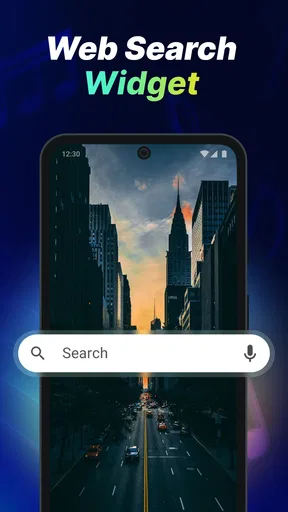
Widgets and Quick Access
If you’re like me and love having everything accessible right from your home screen, you’ll appreciate the widgets. The app offers a variety of widgets that you can place on your home screen for quick access to your sound profiles. It’s simple, yet incredibly effective. Just tap the widget, and voilà, your phone’s sound settings are exactly how you need them.
Additional Features Worth Mentioning
Beyond the basics, Volume Control Sound Launcher also comes packed with additional features that add to its appeal. For instance, you can set automatic rules. Imagine your phone automatically switching to silent mode when you connect to your office Wi-Fi. How cool is that?
Moreover, if you’re an Android user, the app integrates seamlessly with your device’s existing systems. It’s not invasive and doesn’t hog resources, which is always a plus. You’ll hardly notice it’s there until you need it, which is exactly how it should be.
Performance and Reliability
In terms of performance, the app runs smoothly without any noticeable glitches. I've been using it for a week, and it hasn't crashed or lagged once. The developers clearly put a lot of thought into making sure it’s reliable and user-friendly. It’s lightweight, so it doesn’t slow down your device, and it works well even on older models.
Battery consumption is minimal, another big win in my book. You won’t find your phone’s battery draining faster just because you’re using this app, which is something I always look for in utility apps.
Final Thoughts: A Must-Have for Sound Management
All in all, Volume Control Sound Launcher is a fantastic app for anyone looking to take control of their phone’s sound settings. It’s practical, easy to use, and offers features that genuinely make life easier. Whether you’re constantly on the go or just want a hassle-free way to manage your phone’s volume, this app is worth checking out.
If you’re ready to say goodbye to the volume struggles, give Volume Control Sound Launcher a try. You might just wonder how you ever lived without it.
Pros
- Customizable sound profiles.
- User-friendly interface.
- Battery-saving features.
- Quick access from notification bar.
- Supports scheduling sound changes.
Cons
- Limited free version features.
- Occasional ad interruptions.
- No widget support.
- Compatibility issues on older devices.
- Requires background running permissions.
FAQs for Volume Control Sound Launcher
What is Volume Control Sound Launcher and how does it work?
Volume Control Sound Launcher is an app designed to give users precise control over their device's audio settings. It allows you to customize volume levels for different apps and notifications, ensuring an optimal listening experience. With an intuitive interface, users can easily adjust sound settings, create presets, and switch between them effortlessly.
Is Volume Control Sound Launcher compatible with all devices?
Volume Control Sound Launcher is compatible with most Android and iOS devices. However, some features might vary depending on the device model and operating system version. It’s always recommended to check the app's compatibility on the download page or within the app store to ensure all functionalities are supported on your device.
Does Volume Control Sound Launcher affect battery life?
While Volume Control Sound Launcher is designed to run efficiently, any app that operates continuously in the background can impact battery life. The effect is generally minimal, but users may notice some battery usage, especially if the app is frequently adjusting volume levels or running complex tasks.
Can I use Volume Control Sound Launcher to manage multiple profiles?
Yes, Volume Control Sound Launcher allows users to create and manage multiple sound profiles. This feature is particularly useful for switching between different audio settings for various environments, such as work, home, or travel. Users can quickly activate these profiles, enhancing convenience and personalization.
Is there a cost associated with using Volume Control Sound Launcher?
Volume Control Sound Launcher offers both a free version and a premium version with additional features. The free version includes basic functionalities, while the premium version provides advanced options such as ad-free usage and enhanced customization. Users can choose according to their needs and budget.


